Turning University Email Chaos into a Scalable Communication System
UX Designer for Marketing and Communications at The University of Texas at El Paso
Email campaigns were one of UTEP’s most important recruitment tools, but behind the scenes, the process was fragmented. Developers rebuilt layouts for every campaign, branding varied across departments, and emails often broke across Outlook, Gmail, and mobile devices.
Instead of designing another template, I approached the challenge as a UX systems problem, creating a modular email design system that could scale across teams, campaigns, and legacy platforms.
Key features:
• User experience design and user interface that helps emails communicate enrollment information, events and tasks to prospective students.
• Cross-departmental Collaboration
• Data driven content and interactions
Role
UX/UI Designer
Scope
Team of 3 Staff and 3 Students
3 month time frame
Cross Collaboration within Marcomm
Tools
Figma, Cascade CMS, Adobe Creative Suite, Wrike Project Management Software
Introducing Structure and Collaboration
One of my first steps was introducing Figma into the workflow. The team had previously experimented with Adobe XD, but the tool was being used only lightly and lacked the shared, collaborative environment needed for system-level design.
Using Figma, I created a shared workspace where design components, layout rules, and documentation could live together. This allowed developers, marketing staff, and stakeholders to see how the system worked and collaborate more effectively.
From there, I began designing a modular email design system.
The system included reusable components such as headers, hero sections, text modules, image grids, CTAs, and standardized footers. Each component was designed with accessibility, brand consistency, and responsiveness in mind.
Developers translated these component specifications directly into Cascade CMS templates, allowing marketing staff to assemble campaigns simply by entering content. What once required design and development intervention became a streamlined publishing workflow.
Understanding the Audience
While building the system, I also wanted to better understand the students these emails were meant to reach.
I proactively organized a small UX research effort with instructors from the Go Centers, a College Preparation Program in the Ysleta Independent School District, specifically those running the district’s annual program. These centers help high school students navigate the college preparation and application process.
Through conversations with instructors, I was able to get a snapshot of how students were actually being prepared for college and how they interacted with university communications.
One key insight emerged:
Some of the marketing campaigns being sent from the university were not reaching students in the way the department expected.
This discovery revealed an opportunity. By aligning messaging with Go Center instructors, the university could create a more direct communication channel with prospective students and ensure campaigns were better timed and contextualized within the college preparation process.
System Workflow
Mapping out the user flow helped establish the tasks for building emails using the in-house production tools
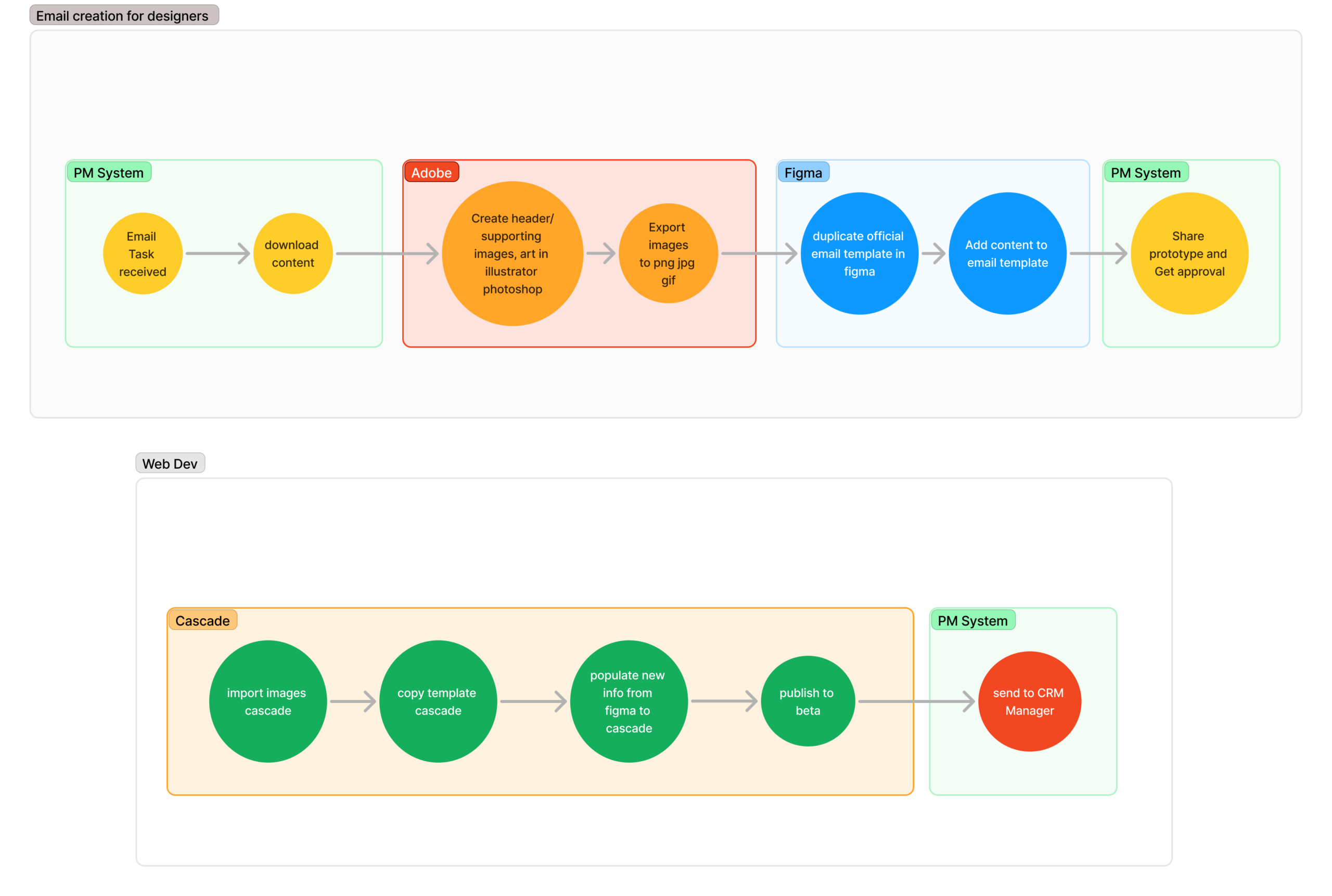
Workflow Chart for email production
The Result
The final email system balanced speed, accessibility, and brand safety.
Campaigns could now be assembled quickly using CMS templates, emails rendered reliably across Outlook, Gmail, and mobile clients, and marketing teams gained confidence that their communications were consistent and accessible.
Perhaps the clearest sign of success was operational: the system became efficient enough that a dedicated role was created to manage email campaigns using the template system, transforming what had once been an ad-hoc design task into a sustainable workflow.
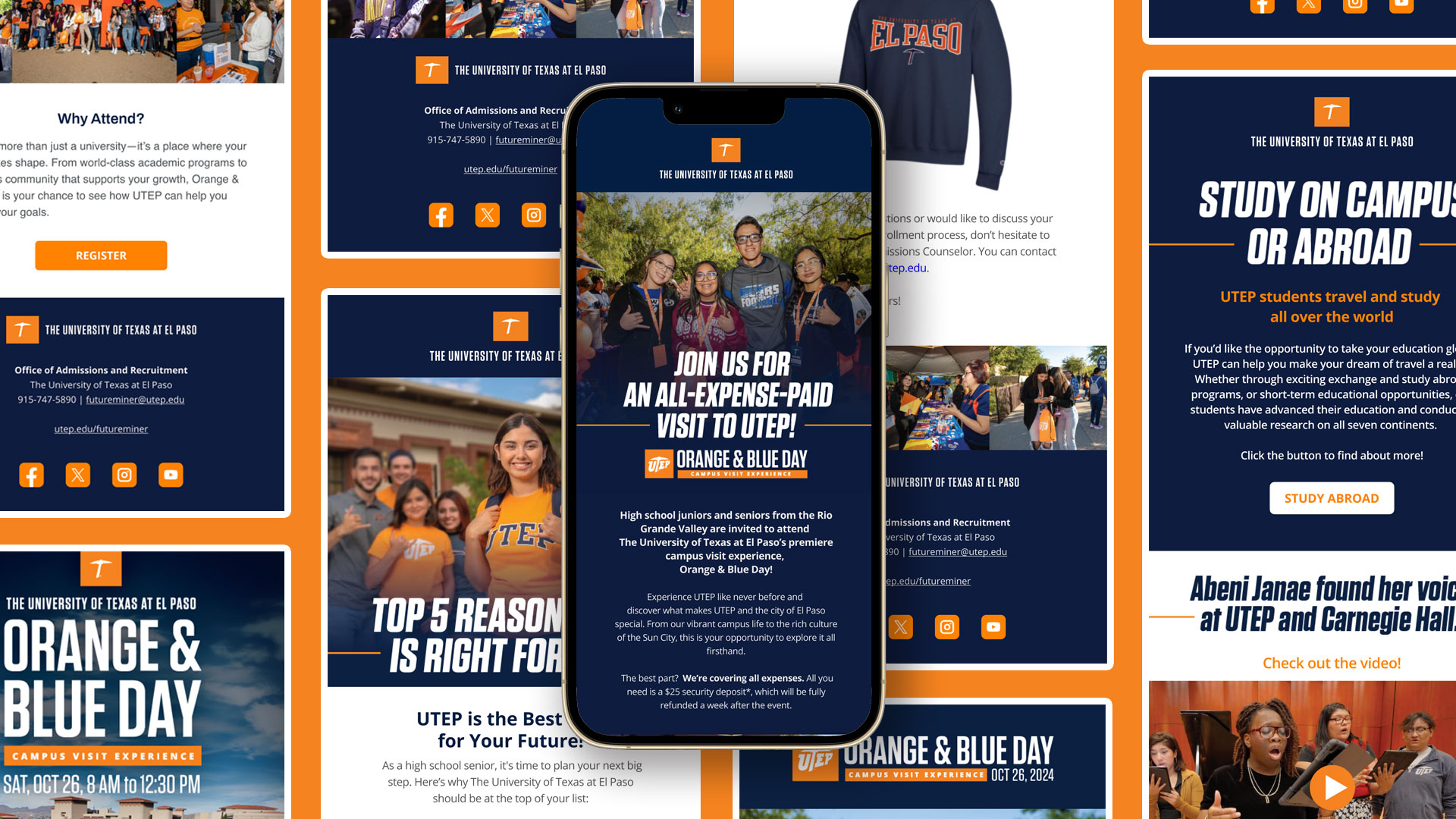
Mockups
These mock concepts were the official designs that were used in the prototype stage of email campaign launch.